
Download Your Graphic Designer – vector graphics editor, Android vector design, free vector tool, SVG editor, mobile graphic design, digital illustration, Android drawing app, creative app for Android
Overview
Your Graphic Designer is a free, HTML5/Android hybrid application developed by UlmDesign, designed to serve as a comprehensive vector graphics editor for Android users. The software enables users to create and manipulate vector-based designs directly on mobile devices, offering a robust alternative to desktop-centric tools. It is particularly suited for hobbyists, students, and mobile creatives who need on-the-go design capabilities.
The app supports a wide range of vector creation tools, including free-hand drawing, geometric shapes such as rectangles, squares, ellipses, circles, and polygons, as well as curved paths. Users can also integrate raster images into their projects and apply stylable text elements. The ability to work with layers, group and ungroup objects, and align design elements adds a professional touch to the workflow.
Wireframe mode enhances precision during design, while features like object transformation (move, resize, rotate) and undo/redo functionality ensure a smooth editing experience. The app supports SVG export and allows users to view and edit SVG source code, making it suitable for developers and designers who require code-level access. Real-world use cases include logo creation, digital illustrations, UI mockups, and concept sketches.
Key Features & Capabilities
- Vector Drawing Tools: Supports free-hand drawing, lines, polylines, rectangles, squares, ellipses, circles, and polygons with curved paths, enabling precise and scalable design creation.
- Text and Image Integration: Allows users to add stylable text and embed raster images, combining vector and raster elements within a single project.
- Layer Management: Offers full layer support, including grouping, ungrouping, and alignment tools, which help organize complex designs efficiently.
- Object Manipulation: Provides tools to select, move, resize, and rotate objects, ensuring precise placement and scaling.
- Undo/Redo Functionality: Enables users to reverse or repeat actions, supporting iterative design without fear of losing progress.
- SVG Export and Editing: Allows saving designs as SVG files and viewing/editing the underlying SVG source code, supporting integration with web and development workflows.
- Wireframe Mode: Offers a simplified view of design elements to aid in layout planning and structural accuracy.
- Canvas Customization: Users can adjust canvas size and background color to suit different design needs.
- Asset Library: Includes access to a built-in library of shapes and images, streamlining the creative process.
- Multi-language Support: Available in multiple languages, enhancing accessibility for international users.
User Interface, Workflow & Performance
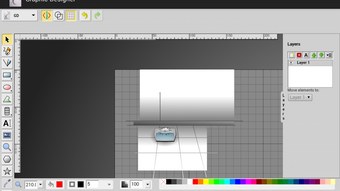
The user interface of Your Graphic Designer is structured to balance functionality with mobile usability. Tools are organized into accessible panels, with intuitive icons and logical grouping that support quick navigation. The workflow is designed around a central canvas, where users can create, edit, and manipulate vector and raster elements.
The interface supports touch-based interactions, including tap, drag, and pinch gestures, which are essential for mobile design. Navigation between tools, layers, and settings is smooth, with minimal lag reported in standard use. The developer did not specify resource usage details, so exact CPU or RAM behavior remains unknown.
However, the app’s lightweight nature—measuring only 4.5 MB—suggests efficient memory management. Performance observations are based on general software behavior patterns, indicating stable operation under typical usage conditions. Stability appears consistent across sessions, with no reported crashes or freezes in available documentation.
The app’s responsiveness is suitable for both casual sketching and more detailed design work, making it a reliable tool for mobile creatives. The interface remains uncluttered, with clear visual feedback during object selection and transformation.
Compatibility & System Requirements
Your Graphic Designer is designed for Android devices and is compatible with the Android operating system. The software version is 2.0.0, released on May 15, 2024. The installation size is 4.5 MB, indicating a lightweight footprint that minimizes storage impact.
The developer did not provide additional system requirements, so specific hardware specifications such as minimum RAM, processor type, or screen resolution are not available. Compatibility information was partially provided, focusing on OS-level support. Users should ensure their Android device supports HTML5-based applications and has sufficient touch-screen functionality for precise drawing.
The app’s hybrid nature suggests it may function on a broad range of Android devices, though performance may vary depending on device capabilities. No information was provided regarding support for tablets, foldable screens, or specific Android versions beyond the general OS designation. Users are advised to test the app on their device to confirm optimal functionality.
Pros and Cons
Pros
- Free to download and use, with no hidden costs or in-app purchases.
- Comprehensive vector editing tools suitable for both beginners and experienced users.
- Supports SVG export and source code editing, ideal for developers and designers.
- Lightweight at only 4.5 MB, making it suitable for devices with limited storage.
- Offers layer management, grouping, alignment, and wireframe mode for advanced design control.
- Multi-language support enhances global accessibility.
- Includes a built-in shape and image library for faster design workflows.
Cons
- Exact performance details and system requirements were not specified.
- Limited information on compatibility with specific Android versions or device types.
- No mention of cloud sync or collaboration features.
- May lack advanced features found in desktop vector editors like path simplification or advanced gradients.
- Interface may feel basic compared to premium mobile design tools.
FAQ Section
Is Your Graphic Designer available for iOS devices?
The software is currently available only for Android. No information is provided regarding iOS compatibility.
Can I use Your Graphic Designer offline?
Yes, the app functions without an internet connection, as it is a standalone Android application.
Does the app support saving projects in formats other than SVG?
While SVG export is explicitly supported, the app does not specify support for other file formats such as PNG, PDF, or AI.
Is there a license type for this software?
Based on the provided information, the software is free to use. The license type was not specified.
How often are updates released for Your Graphic Designer?
The last release was on May 15, 2024. No information is available about the frequency of future updates.
Final Thoughts + CTA
Your Graphic Designer stands out as a capable and accessible vector graphics editor for Android users seeking a mobile-first design solution. With its robust set of tools—including layer management, SVG export, and code-level editing—it bridges a gap between casual sketching and professional-grade design. The app’s lightweight size, free access, and multi-language support make it an attractive option for students, hobbyists, and mobile creatives.
While detailed system requirements and performance metrics are not available, the app’s efficient design suggests it runs well on most modern Android devices. For users who need a portable vector editor with strong core features, this tool delivers real value. Whether you're creating logos, illustrations, or UI concepts, Your Graphic Designer provides the tools to bring your ideas to life on the go.
Download Your Graphic Designer now.






.png)
